
Realpacking Recording Program v3.6.0 is now available.
This update introduces two new worker types designed to fit various warehouse workflows, along with an upload speed limit feature that adapts to different network environments. Discover how you can implement Realpacking without disrupting your existing processes.
These new worker types were developed based on direct feedback from our customers' warehouse operations.
For example, some fulfillment centers running line-based workflows have separate workers handling picking, inspection, and packing—with the invoice scanned only once by the final worker. These customers wanted to maintain their existing processes while automatically recording videos with Realpacking.
Another customer operated a workflow where one person verbally calls out orders while others listen and pack. The challenge was that when mis-shipments or omissions occurred, it was nearly impossible to pinpoint where the error happened.
To accommodate these diverse workflows, we've created two new worker types: End-Mapping Continuous and Order Inspection Continuous.
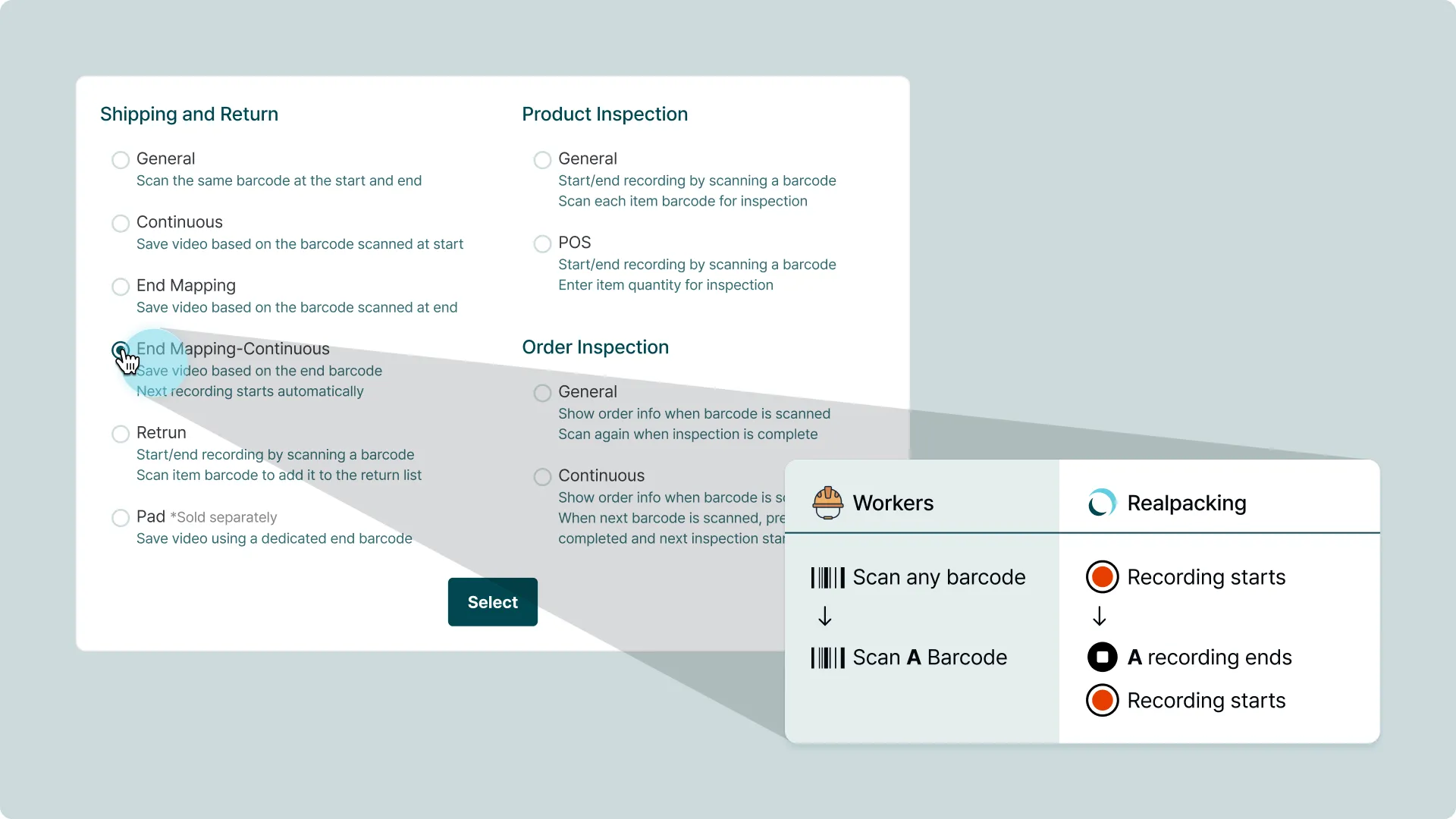
End-Mapping Continuous saves the video based on the barcode scanned at the end of recording, then automatically starts the next recording session. The familiar start-stop workflow remains unchanged—one scan saves the current recording and prepares the next one.
In line-based operations, when the final packer scans the shipping label, the video is automatically saved and the next recording begins immediately. Workers don't need to manually start or stop recordings—they just scan the label as usual.
This mode is ideal for line-based workflows where multiple workers handle different tasks and assigning a recording code to each step isn't practical. For single-worker operations handling picking, packing, and sealing from start to finish, the existing Standard, End-Mapping, or Continuous modes work perfectly.
1. Log in to the Web Admin
2. Go to Member Management
3. Select "End-Mapping Continuous" for the worker's recording type
4. Have the worker log out and back in to the Recording Program

Order Inspection Continuous displays order details on the Recording Program screen when a barcode is scanned. Workers can verify products against the on-screen information while packing. Scanning the next barcode automatically completes the current order and displays the next one while starting a new recording.
This mode is already in use at facilities with large TV displays where multiple workers view the screen together. Previously, a supervisor would verbally call out order items while packers listened and packed. Now, with order details displayed on screen, packers can visually confirm the correct products themselves.
This eliminates the need for someone to call out orders, reducing human error and labor costs. With minimal scanning required, teams can maintain efficiency while improving accuracy.
1. Log in to the Web Admin
2. Go to Member Management
3. Select "Order Inspection Continuous" for the worker's recording type
4. Have the worker log out and back in to the Recording Program
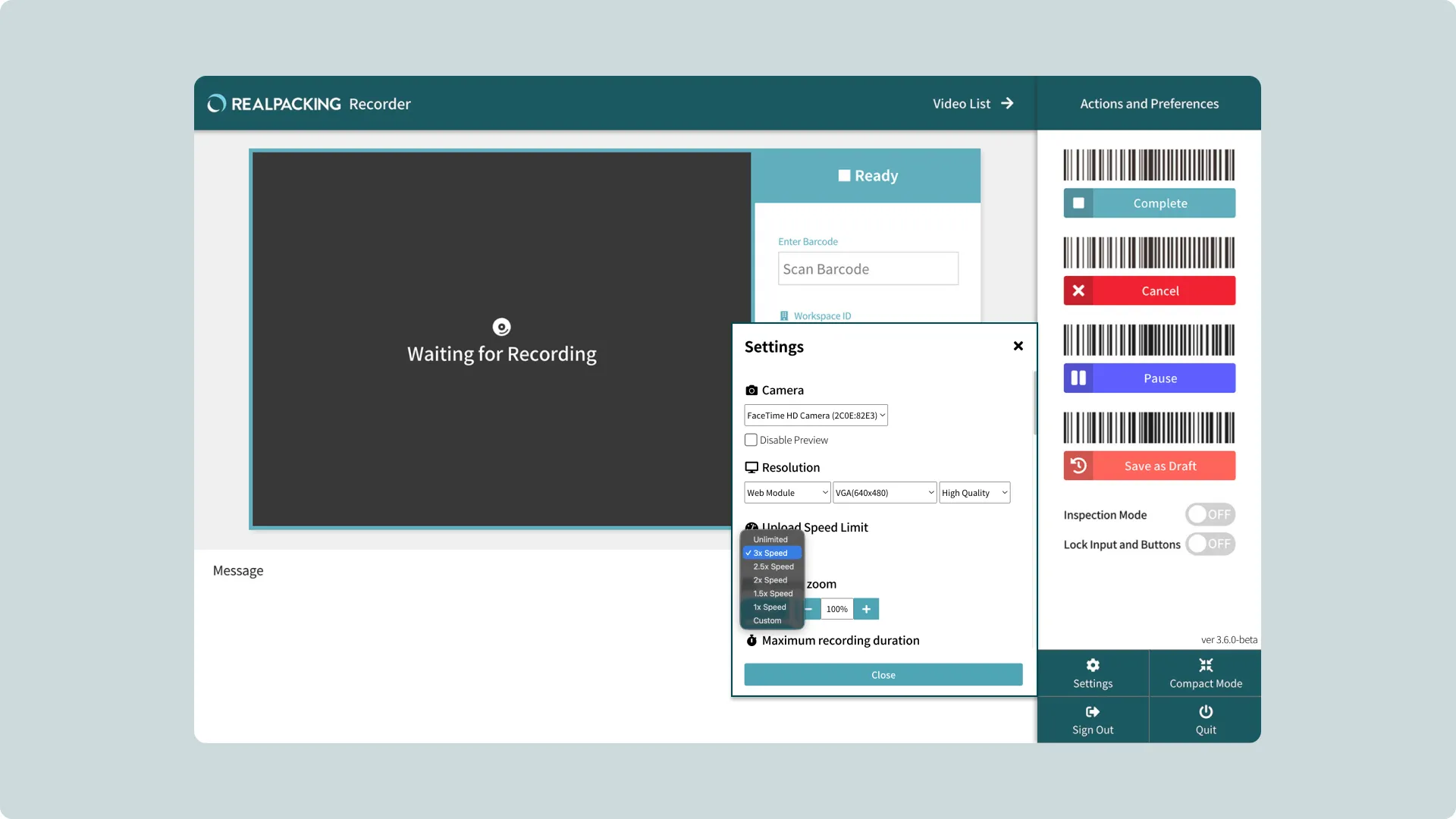
For facilities with slower internet connections, we've added an upload speed limit feature. This helps maintain stable operations in environments running multiple systems like WMS and label printing software simultaneously.
The feature offers speed multiplier options. For example, selecting 2x means a 10-second video uploads in about 5 seconds. You can also manually enter specific bandwidth limits in MB/s or Mbps to fine-tune settings for your network environment.
1. Log in to the Recording Program
2. Go to Settings
3. Choose your preferred speed multiplier or enter a custom value
✅ Memory Stability: Improved memory management for reliable operation during extended recording sessions.
✅ File Storage Reliability: Reduced errors in video file saving and processing.
✅ Network Error Handling: Enhanced retry mechanisms for more stable uploads during network issues.
✅ Individual File Error Handling: Errors in individual files no longer affect other uploads.
📌 These features are available to customers using Realpacking Recording Program v3 who choose to update to v3.6.0.
If you've been looking for recording modes that match your workflow, explore the new worker types. If network management has been a concern, check out the upload speed limit feature.
We'll continue developing practical features based on real feedback from the field.


